

The shift to cloud computing has fundamentally transformed how small businesses manage their IT infrastructure. While cloud services offer unprecedented flexibility, scalability, and cost savings, they also introduce unique security challenges that require careful attention. Understanding it security cloud fundamentals isn't just a technical necessity-it's a business imperative that protects your data, maintains customer trust, and ensures regulatory compliance. For small businesses in particular, implementing robust cloud security measures can mean the difference between operational continuity and catastrophic data breaches.
Understanding the Shared Responsibility Model
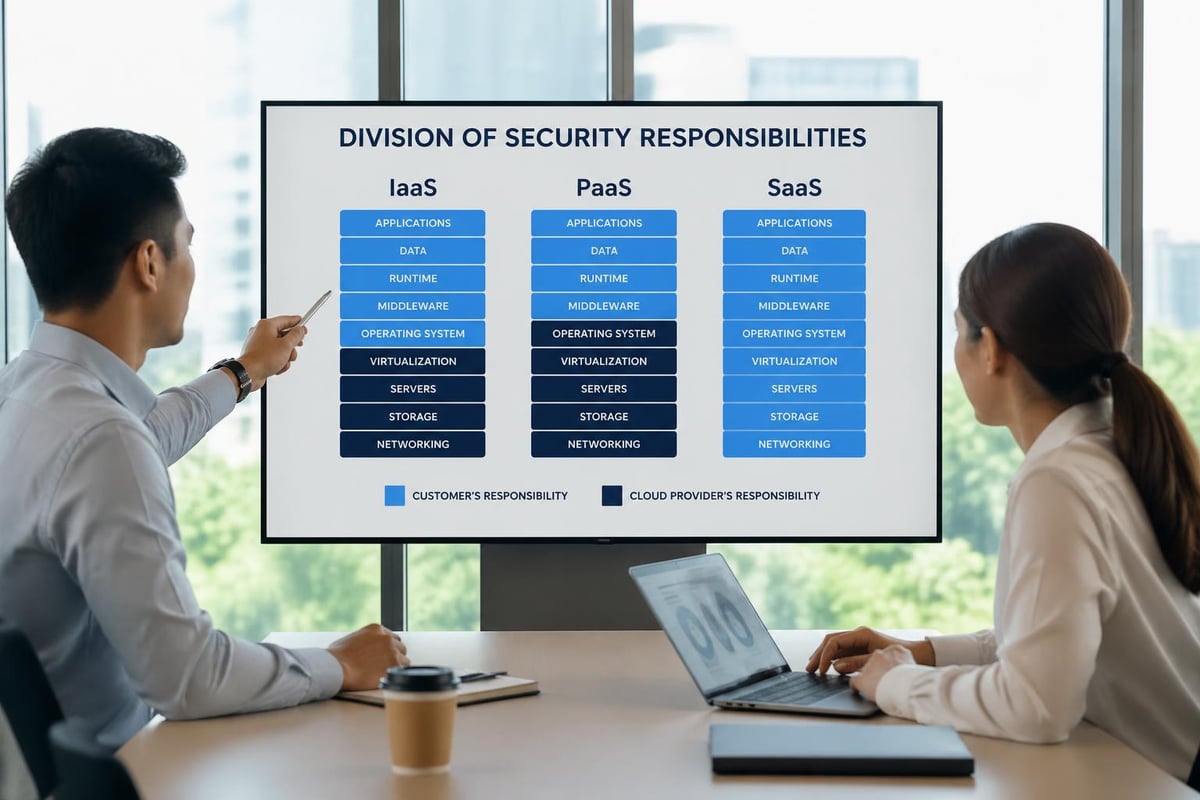
Cloud security operates on a principle that many businesses overlook: the shared responsibility model. Your cloud service provider handles certain security aspects, while you remain responsible for others.
Provider Responsibilities:
- Physical infrastructure security
- Hypervisor and network layer protection
- Service availability and redundancy
- Platform-level security updates
Your Responsibilities:
- Data encryption and classification
- Access management and authentication
- Application-level security configurations
- Compliance with industry regulations
This division creates a critical gap where many security incidents occur. According to recent research, 80% of cloud breaches result from basic security errors, highlighting how fundamental mistakes in understanding these responsibilities lead to preventable incidents.
Mapping Your Security Obligations
The specific division of responsibilities varies by service model. Infrastructure as a Service (IaaS) places more security burden on your organization, while Software as a Service (SaaS) shifts more responsibility to the provider.
| Service Model | Provider Controls | Your Controls |
|---|---|---|
| IaaS | Hardware, hypervisor, network | OS, applications, data, access |
| PaaS | Hardware, OS, middleware | Applications, data, user access |
| SaaS | Everything except user management | User access, data classification |
Small businesses must clearly document who owns each security layer to avoid dangerous assumptions about protection.
Identity and Access Management Foundations
Controlling who accesses your it security cloud environment represents your first line of defense. Identity and Access Management (IAM) determines not just authentication but also authorization levels for every user and service.
The principle of least privilege should govern every access decision. Users receive only the minimum permissions necessary to perform their specific job functions. This approach limits the damage from compromised credentials or insider threats.
Implementing Multi-Factor Authentication
Multi-factor authentication (MFA) adds essential protection beyond passwords. Even strong passwords become vulnerable to phishing attacks, credential stuffing, or social engineering tactics.
MFA implementation priorities:
- Enable MFA for all administrative accounts first
- Extend MFA to regular user accounts accessing sensitive data
- Use time-based one-time passwords (TOTP) or hardware tokens
- Implement conditional access policies based on location and device
- Create emergency access procedures for MFA failures
Modern MFA solutions integrate seamlessly with most cloud platforms. The comprehensive framework from Cato Networks emphasizes that managing access to corporate data starts with robust authentication mechanisms that adapt to risk levels.
Role-based access control (RBAC) complements MFA by organizing permissions around job functions rather than individual users. When employees change roles or leave your organization, RBAC simplifies the process of adjusting or revoking access appropriately.
Data Encryption Strategies
Protecting data in your it security cloud environment requires encryption at multiple stages. Data exists in three states-at rest, in transit, and in use-each requiring specific encryption approaches.
Encryption requirements by data state:
- At rest: AES-256 encryption for stored files, databases, and backups
- In transit: TLS 1.3 for all data moving between systems
- In use: Emerging technologies for processing encrypted data without decryption
Most cloud providers offer default encryption for data at rest, but you control the encryption keys. Key management determines whether encryption truly protects your data or simply creates a false sense of security.
Key Management Best Practices
Your encryption remains only as strong as your key management practices. Losing encryption keys means losing access to your data permanently, while compromised keys expose everything they protect.
Consider these key management priorities:
- Store encryption keys separately from encrypted data
- Rotate keys regularly according to compliance requirements
- Implement automated key rotation where possible
- Maintain secure backup copies of critical keys
- Use hardware security modules (HSMs) for sensitive operations
The distinction between customer-managed keys and provider-managed keys affects your control level. Customer-managed keys offer greater security control but increase operational complexity, particularly for small businesses with limited IT resources.

Network Security and Segmentation
Traditional perimeter-based security doesn't translate effectively to cloud environments. Your it security cloud strategy must account for dynamic, distributed networks where resources spin up and down automatically.
Network segmentation divides your cloud environment into isolated zones based on sensitivity and function. This containment strategy limits lateral movement if attackers breach one segment.
| Segmentation Strategy | Use Case | Security Benefit |
|---|---|---|
| Virtual Private Cloud (VPC) | Isolate production from development | Prevents test environment exploits affecting production |
| Subnets | Separate web servers from databases | Limits direct database access from internet |
| Security groups | Control traffic between specific resources | Enforces least privilege at network level |
| Network ACLs | Broad traffic filtering by subnet | Provides additional defense layer |
Firewall Configuration Essentials
Cloud-native firewalls operate differently from traditional hardware appliances. Security groups and network access control lists (NACLs) require careful configuration to balance security with operational needs.
Default-deny rules create the most secure baseline. Rather than blocking known threats, you explicitly permit only legitimate traffic patterns. This approach catches unexpected attack vectors automatically.
Regular firewall audits identify configuration drift and unused rules accumulating over time. AWS cloud security best practices recommend quarterly reviews of all security group rules to eliminate outdated permissions.
Continuous Monitoring and Threat Detection
Static security configurations become obsolete quickly in dynamic cloud environments. Continuous monitoring provides real-time visibility into your it security cloud infrastructure, detecting anomalies before they escalate into breaches.
Cloud-native monitoring tools track multiple signal types:
- User behavior analytics detecting unusual access patterns
- Network traffic analysis identifying suspicious communications
- Configuration change monitoring catching unauthorized modifications
- Resource utilization tracking revealing cryptomining or data exfiltration
- Log aggregation correlating events across distributed systems
Establishing Baseline Behaviors
Effective threat detection starts with understanding normal operations. Machine learning algorithms establish behavioral baselines, then flag deviations requiring investigation.
Key metrics for baseline establishment:
- Typical authentication patterns by user and time
- Normal data transfer volumes and destinations
- Standard resource provisioning and decommissioning
- Expected API call patterns and frequencies
- Baseline privilege usage for administrative accounts
Small businesses often lack dedicated security operations centers (SOCs) to monitor alerts 24/7. Managed security service providers bridge this gap, offering expert monitoring and response without requiring full-time internal staff.
The importance of proper monitoring implementation cannot be overstated. Understanding nine essential cloud security best practices helps organizations implement monitoring that actually catches threats rather than generating alert fatigue.
Backup and Disaster Recovery Planning
Cloud services offer high availability, but they don't eliminate the need for comprehensive backup strategies. Your it security cloud approach must account for data loss scenarios ranging from ransomware attacks to accidental deletions.
The 3-2-1 backup rule adapts well to cloud environments: maintain three copies of data, on two different media types, with one copy offsite. Cloud storage naturally satisfies the geographic distribution requirement, but media diversity requires intentional planning.
Defining Recovery Objectives
Two metrics govern backup strategy effectiveness:
Recovery Time Objective (RTO): Maximum acceptable downtime before business operations suffer unacceptable damage. Small businesses typically target RTOs between 4-24 hours depending on application criticality.
Recovery Point Objective (RPO): Maximum acceptable data loss measured in time. An RPO of one hour means you can afford to lose up to one hour of recent transactions.
| Business Function | Typical RTO | Typical RPO | Backup Frequency |
|---|---|---|---|
| Email systems | 4 hours | 15 minutes | Continuous replication |
| Customer database | 2 hours | 1 hour | Hourly snapshots |
| File storage | 8 hours | 4 hours | Daily backups |
| Development environments | 24 hours | 24 hours | Weekly backups |
Testing recovery procedures regularly validates that backups actually work when needed. Many organizations discover their backups are corrupted or incomplete only during actual disaster scenarios.

Compliance and Regulatory Considerations
Industry regulations impose specific requirements on your it security cloud implementation. Healthcare organizations face HIPAA requirements, financial services must comply with regulations like SOC 2, and businesses handling payment cards must meet PCI DSS standards.
Cloud environments complicate compliance because data and processing may span multiple geographic regions with different legal requirements. Data residency rules in certain jurisdictions mandate that information about local citizens remains within specific geographic boundaries.
Documentation and Audit Trails
Compliance frameworks universally require comprehensive documentation of security controls and detailed audit trails of all system activities.
Essential documentation elements include:
- Security policy documents defining organizational standards
- Risk assessment reports identifying and prioritizing threats
- Incident response procedures for security events
- Access control matrices showing who can access what data
- Change management records tracking configuration modifications
The Cloud Security Alliance’s comprehensive guide covers twelve domains of cloud security, including governance and compliance frameworks that help organizations meet regulatory requirements systematically.
Many compliance standards require annual audits by independent assessors. Maintaining security controls consistently throughout the year prevents scrambling before audit deadlines.
Managing Multi-Cloud Complexity
Organizations increasingly adopt multi-cloud strategies, using services from multiple providers to avoid vendor lock-in and optimize costs. However, this approach introduces significant it security cloud challenges.
Each cloud provider implements security differently. AWS security groups don't work like Azure network security groups, and Google Cloud Platform uses yet another model. Security teams must master multiple platforms or risk configuration errors.
Unified security policies become difficult to enforce across disparate environments. What you can restrict in one cloud may not have equivalent controls in another, creating gaps attackers exploit.
The complexity gap presents real risks. Managing complex cloud environments requires unified platforms that provide consistent visibility and control across multiple cloud providers.
Cloud Security Posture Management
Cloud Security Posture Management (CSPM) tools address multi-cloud complexity by continuously assessing configurations against security best practices and compliance requirements.
CSPM capabilities:
- Automated discovery of all cloud resources across platforms
- Configuration assessment against security benchmarks
- Real-time alerts for risky configuration changes
- Compliance reporting for multiple regulatory frameworks
- Remediation guidance for identified security issues
These tools reduce the burden on small IT teams by automating security tasks that would otherwise require manual effort across each cloud platform.
DevSecOps Integration
Traditional approaches treated security as a final gate before production deployment. Modern it security cloud practices integrate security throughout the development lifecycle, embodying the DevSecOps philosophy.
Automated security testing catches vulnerabilities early when they're cheapest to fix. Waiting until production deployment means security issues require expensive emergency patches that disrupt business operations.
Infrastructure as Code (IaC) enables security policy enforcement at the template level. Rather than manually configuring each resource, you define infrastructure in code that undergoes security review before deployment.
Continuous Security Validation
Security isn't a one-time implementation but an ongoing process adapting to new threats and business changes.
Security validation activities:
- Automated vulnerability scanning of container images
- Static code analysis identifying security flaws
- Dynamic application security testing of running applications
- Penetration testing simulating real-world attacks
- Configuration drift detection catching unauthorized changes
Integration with CI/CD pipelines ensures security checks happen automatically with every code change. Developers receive immediate feedback about security issues, making fixes part of their normal workflow rather than separate remediation projects.
Vendor Security Assessment
Your it security cloud security extends beyond your direct control to include every vendor and service provider accessing your environment. Third-party vulnerabilities frequently serve as entry points for attackers targeting your organization indirectly.
Vendor security assessments evaluate whether service providers maintain adequate security controls protecting your data. Assessment rigor should match the sensitivity of data the vendor accesses and the criticality of services they provide.
Security Questionnaire Essentials
Standardized security questionnaires streamline vendor assessments while ensuring consistent evaluation criteria.
| Assessment Area | Key Questions | Red Flags |
|---|---|---|
| Data protection | Encryption methods, key management | Unencrypted storage, shared encryption keys |
| Access controls | Authentication requirements, privilege management | Single-factor authentication, excessive permissions |
| Incident response | Detection capabilities, notification procedures | No incident response plan, slow notification |
| Compliance | Certifications held, audit frequency | No third-party audits, expired certifications |
Request evidence supporting vendor claims rather than accepting assertions. SOC 2 reports, ISO certifications, and penetration test results provide independent validation of security practices.
Understanding the balance between benefits and risks in multi-cloud environments helps organizations make informed decisions about which vendors and services merit inclusion in their cloud strategy.
Security Awareness Training
Technical controls alone cannot secure your it security cloud environment. Human behavior remains the weakest link in most security programs, making employee training essential.
Phishing attacks targeting cloud credentials have become increasingly sophisticated. Attackers craft convincing emails appearing to come from your cloud provider, requesting password resets or MFA confirmations.
Regular security awareness training keeps cloud security top of mind for employees. Training should cover practical scenarios employees actually encounter rather than abstract threats they'll never face.
Effective Training Components
- Simulated phishing exercises testing whether employees recognize and report suspicious emails
- Role-specific training addressing security responsibilities unique to different job functions
- Incident reporting procedures making it easy for employees to report security concerns
- Password management best practices encouraging unique, strong passwords for cloud services
- Social engineering awareness recognizing manipulation tactics attackers use
Quarterly training refreshers reinforce concepts better than annual sessions where information is quickly forgotten. Short, focused modules work better than lengthy training marathons that overwhelm participants.
Cost Optimization Without Compromising Security
Cloud security sometimes appears at odds with cost optimization, but this represents a false dichotomy. Many security best practices actually reduce costs by preventing expensive breaches and optimizing resource usage.
Right-sizing security controls to actual risk prevents over-investment in protections that don't match threat levels. Not all data requires the same security rigor-classification systems identify which information deserves premium protection.
Automated security tools reduce labor costs while improving consistency. Manual security reviews scale poorly as cloud environments grow, but automation handles increased workloads without proportional cost increases.
Cost-effective security measures:
- Automated policy enforcement reducing configuration errors
- Security groups controlling traffic without expensive firewall appliances
- Built-in encryption using provider-managed keys
- Log aggregation reducing time spent investigating incidents
- Automated compliance reporting eliminating manual documentation
Small businesses particularly benefit from managed IT services that provide enterprise-grade security expertise without requiring full-time security staff salaries. The expertise and comprehensive cloud security practices from CrowdStrike and similar resources inform managed service approaches that deliver robust protection efficiently.
Implementation Roadmap for Small Businesses
Moving from current state to comprehensive it security cloud protection requires structured planning. Attempting everything simultaneously overwhelms small IT teams and increases the risk of configuration errors.
A phased approach prioritizes highest-impact security measures first, building a solid foundation before adding advanced capabilities.
Phase 1 (Months 1-2): Foundational Security
- Enable MFA for all user accounts
- Implement principle of least privilege
- Configure basic network segmentation
- Enable cloud provider logging
- Establish backup procedures
Phase 2 (Months 3-4): Enhanced Monitoring
- Deploy security monitoring tools
- Configure automated alerts for critical events
- Establish incident response procedures
- Conduct initial security training
- Document security policies
Phase 3 (Months 5-6): Advanced Protection
- Implement automated compliance checking
- Deploy vulnerability scanning
- Establish security testing in development
- Conduct vendor security assessments
- Perform first disaster recovery test
This timeline provides realistic expectations for small businesses balancing security improvements with ongoing operational demands.
Measuring Security Effectiveness
Quantifying security program success helps justify continued investment and identifies areas needing improvement. Metrics should measure actual risk reduction rather than activity levels that look productive without improving security posture.
Meaningful security metrics:
- Time to detect security incidents (lower is better)
- Time to remediate identified vulnerabilities (lower is better)
- Percentage of systems with current security patches (higher is better)
- Failed authentication attempts indicating attack activity (trend analysis)
- Compliance audit findings (fewer is better)
Leading indicators predict potential problems before they manifest, while lagging indicators measure past performance. Effective measurement combines both types, using leading indicators to prevent incidents and lagging indicators to validate improvements.
Regular security posture reviews assess whether current controls remain adequate as your cloud environment evolves. What protected your environment six months ago may no longer suffice as attackers develop new techniques and your business adopts new cloud services.
Implementing comprehensive it security cloud practices protects your business data, maintains customer trust, and ensures regulatory compliance while supporting operational efficiency. The strategies outlined here provide a practical framework for small businesses navigating cloud security complexity without requiring enterprise-scale resources. Delphi Systems Inc. helps small businesses in Lethbridge implement robust cloud security through managed IT services that maintain peak operation of your IT networks, allowing you to focus on core business activities while ensuring your cloud infrastructure remains secure and efficiently managed.

