


Small businesses face unprecedented cybersecurity challenges in 2026, with cyber attacks targeting organizations of all sizes at alarming rates. Network security for small business operations is no longer optional but essential for survival in today's digital landscape. Many business owners mistakenly believe that hackers only target large corporations, but statistics reveal that small and medium-sized enterprises are increasingly vulnerable due to limited security resources and expertise. Implementing comprehensive network security measures protects sensitive customer data, maintains business continuity, and preserves your company's hard-earned reputation.
Understanding Network Security Threats Facing Small Businesses
Cybercriminals actively exploit small business vulnerabilities because these organizations often lack dedicated IT security teams. The threat landscape continues to evolve with sophisticated attack vectors designed specifically to penetrate smaller networks. According to recent research, U.S. small businesses are fighting off a wave of cyber attacks that includes phishing campaigns, ransomware deployments, and credential stuffing attempts.
Common Attack Vectors Targeting Small Organizations
Phishing remains the most prevalent entry point for attackers seeking to compromise business networks. Employees receive emails that appear legitimate but contain malicious links or attachments designed to steal credentials or install malware. These attacks have become increasingly sophisticated, often mimicking communications from trusted vendors, financial institutions, or even company executives.
Ransomware attacks pose another critical threat that can paralyze operations within hours. Attackers encrypt essential business data and demand payment for decryption keys, leaving companies unable to access customer information, financial records, or operational systems. The financial impact extends beyond ransom payments to include downtime costs, recovery expenses, and potential regulatory penalties.
- Malware infections through infected websites or software downloads
- Man-in-the-middle attacks intercepting network communications
- Insider threats from disgruntled or careless employees
- Brute force attacks attempting to guess passwords
- Zero-day exploits targeting unpatched software vulnerabilities
Business email compromise (BEC) schemes specifically target financial transactions by impersonating executives or vendors. Attackers research company hierarchies and payment processes before sending carefully crafted requests that appear authentic, leading to fraudulent wire transfers or sensitive data disclosure.

Building a Robust Network Security Foundation
Establishing effective network security for small business environments requires a multi-layered approach that addresses both technological and human factors. The foundation begins with understanding your current infrastructure, identifying critical assets, and recognizing potential vulnerabilities. A former Pentagon cyber operator emphasizes the importance of asset identification and vulnerability assessment as the first steps in building a security program.
Essential Security Components Every Business Needs
Network firewalls serve as the first line of defense by monitoring and controlling incoming and outgoing traffic based on predetermined security rules. Modern firewall solutions for small businesses have evolved beyond simple packet filtering to include deep packet inspection, intrusion prevention, and application-level controls. Selecting the right firewall requires balancing protection capabilities with ease of management, especially for businesses without dedicated IT staff.
Endpoint protection platforms defend individual devices connected to your network, including computers, mobile devices, and servers. These solutions combine traditional antivirus capabilities with behavioral analysis, threat intelligence, and automated response features. Every device accessing company resources represents a potential entry point that requires consistent protection and monitoring.
| Security Component | Primary Function | Business Benefit |
|---|---|---|
| Next-Generation Firewall | Traffic filtering and threat prevention | Blocks unauthorized access attempts |
| Endpoint Detection & Response | Device-level threat protection | Identifies compromised devices quickly |
| Virtual Private Network | Encrypted remote access | Secures work-from-home connections |
| Security Information & Event Management | Log aggregation and analysis | Detects suspicious patterns early |
| Email Security Gateway | Spam and phishing filtering | Reduces social engineering success |
Multi-factor authentication (MFA) adds a critical security layer by requiring users to verify their identity through multiple methods before accessing systems. Even if attackers obtain passwords through phishing or data breaches, MFA prevents unauthorized access by requiring additional verification through mobile apps, hardware tokens, or biometric factors.
Data encryption protects information both in transit across networks and at rest on storage devices. Implementing encryption ensures that intercepted data remains unreadable without proper decryption keys, significantly reducing the value of stolen information to cybercriminals.
Developing Comprehensive Security Policies and Procedures
Technology alone cannot ensure network security for small business operations without corresponding policies that govern how employees interact with systems and data. Written security policies establish clear expectations, define acceptable use parameters, and outline consequences for violations. However, small businesses often struggle to implement effective cybersecurity strategies due to resource constraints and competing priorities.
Creating an Acceptable Use Policy
Your acceptable use policy should define:
- Approved devices and software for business purposes
- Acceptable internet and email usage during work hours
- Social media guidelines related to company information
- Password requirements and credential sharing prohibitions
- Procedures for reporting security incidents or suspicious activity
- Remote work security requirements and VPN usage
- Personal device policies for BYOD environments
- Data handling and storage requirements
Password policies represent a foundational security control that significantly impacts breach risk. Requiring strong, unique passwords across all systems reduces the likelihood of successful credential-based attacks. Organizations should mandate minimum password complexity, enforce regular password changes, and prohibit password reuse across multiple accounts.
Access control policies implement the principle of least privilege by granting employees only the minimum system access necessary to perform their job functions. Regular access reviews ensure that permissions remain appropriate as roles change and that former employee accounts are promptly disabled.
Incident Response Planning
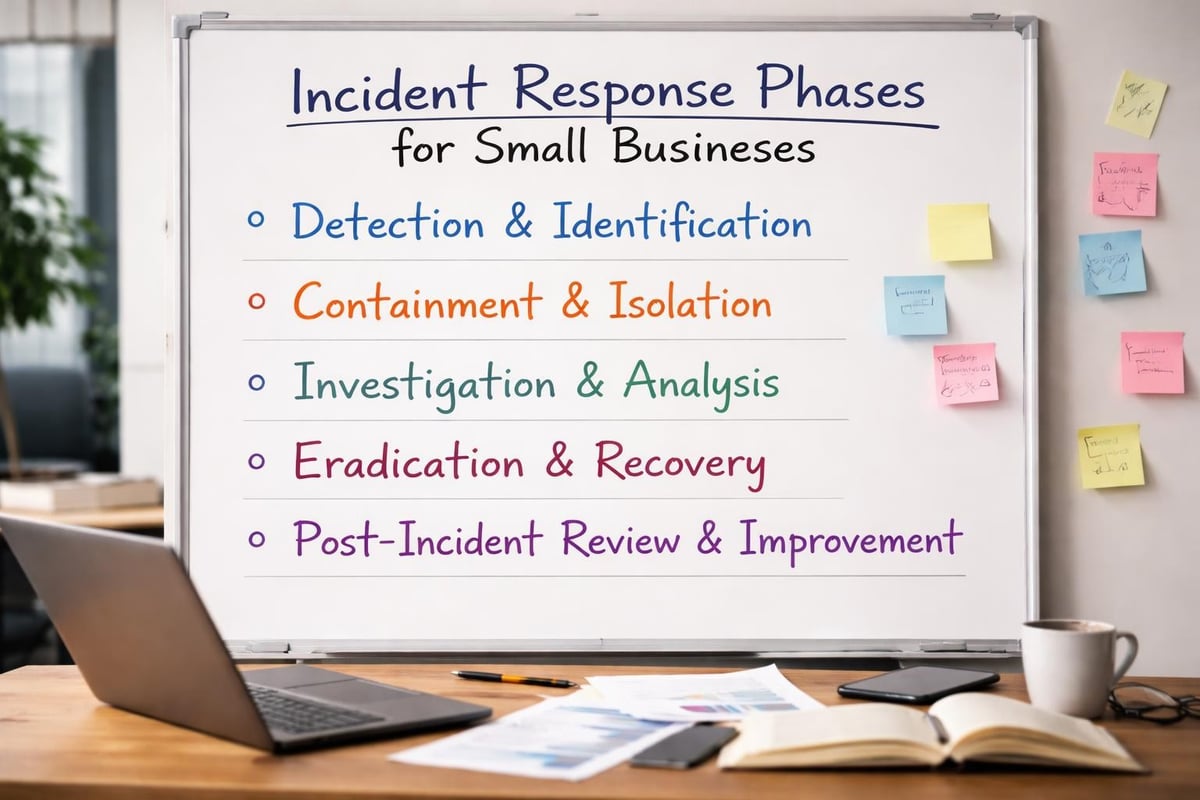
Preparing for security incidents before they occur dramatically reduces response time and minimizes damage. A comprehensive incident response plan outlines specific steps for detecting, containing, investigating, and recovering from security breaches. The U.S. Small Business Administration recommends developing response plans as a critical component of overall cybersecurity preparedness.
Your incident response plan should designate specific roles and responsibilities, establish communication protocols, and define escalation procedures. Regular testing through tabletop exercises reveals gaps in your plan and ensures team members understand their responsibilities during actual incidents.
Implementing Employee Security Awareness Training
Human error contributes to the majority of successful cyber attacks, making employee education essential for effective network security for small business environments. Well-trained employees serve as an additional security layer by recognizing threats, following proper procedures, and reporting suspicious activities promptly. Security awareness training transforms your workforce from a vulnerability into a defensive asset.
Key Training Topics and Delivery Methods
Phishing recognition training teaches employees to identify suspicious emails by examining sender addresses, looking for urgency or unusual requests, and verifying unexpected attachments or links. Simulated phishing campaigns provide practical experience and identify employees requiring additional training. Regular reinforcement maintains vigilance as attack techniques evolve.
Social engineering awareness extends beyond email phishing to include phone-based vishing, text-based smishing, and physical pretexting attempts. Employees learn to verify identities before disclosing sensitive information or granting system access, regardless of communication channel.
Training delivery should include multiple formats to accommodate different learning styles and schedules:
- Interactive online modules with scenario-based learning
- In-person workshops for discussion and questions
- Brief security tips distributed via email newsletters
- Quarterly security updates addressing emerging threats
- New hire onboarding covering essential security practices
Password hygiene training emphasizes creating strong, unique passwords and properly using password managers. Employees learn why password reuse across personal and professional accounts creates cascading security risks and how to generate memorable yet complex passphrases.
Physical security awareness addresses threats beyond digital networks, including proper visitor escort procedures, secure document disposal, device locking when unattended, and reporting lost or stolen equipment.
Leveraging Managed Security Services for Comprehensive Protection
Many small businesses lack the resources, expertise, or time to maintain comprehensive security programs internally. Managed IT service providers offer specialized security knowledge, continuous monitoring capabilities, and economies of scale that make enterprise-grade protection accessible to smaller organizations. This approach allows business owners to focus on core operations while security professionals handle threat detection and response.
Benefits of Outsourced Security Management
Continuous network monitoring detects threats outside regular business hours when many attacks occur. Security operations centers staffed by experienced analysts review alerts, investigate anomalies, and respond to incidents 24/7/365. This round-the-clock vigilance provides protection that internal teams rarely achieve due to staffing and budget constraints.
Managed security services typically include:
- Regular vulnerability scanning and penetration testing
- Patch management ensuring timely security updates
- Security device configuration and optimization
- Threat intelligence integration and analysis
- Compliance assistance for regulatory requirements
- Backup verification and disaster recovery planning
- Security awareness training coordination
Predictable monthly costs replace unpredictable security incident expenses through fixed-rate service agreements. This financial model simplifies budgeting while ensuring consistent security maintenance rather than reactive crisis spending. Businesses avoid the costs of recruiting, training, and retaining specialized security personnel while accessing broader expertise.
| Security Approach | Initial Investment | Ongoing Costs | Expertise Level | Response Time |
|---|---|---|---|---|
| Internal Security Team | High (hiring, training) | High (salaries, tools) | Limited by team size | Business hours only |
| Managed Security Services | Low (no hiring needed) | Moderate (monthly fee) | Broad specialist access | 24/7 monitoring |
| Hybrid Model | Moderate (some hiring) | Moderate to High | Mixed internal/external | Extended coverage |
Regulatory compliance requirements increasingly affect small businesses across industries, particularly regarding data protection and privacy. Managed service providers maintain current knowledge of evolving regulations and implement appropriate controls, documentation, and reporting mechanisms. This expertise helps businesses avoid costly violations while demonstrating due diligence to customers and partners.
Selecting and Deploying Security Tools Effectively
Choosing appropriate security technologies requires balancing protection capabilities, usability, budget constraints, and integration with existing systems. The market offers numerous solutions targeting network security for small business needs, ranging from free open-source tools to comprehensive commercial platforms. Understanding your specific requirements and risk profile guides technology selection decisions.
Evaluating Firewall Solutions
Modern firewall platforms extend far beyond basic port blocking to include unified threat management capabilities. Leading firewall software options combine network security, intrusion prevention, web filtering, and application control in integrated appliances or virtual deployments. Small businesses benefit from solutions that simplify management through intuitive interfaces and automated policy recommendations.
Next-generation firewalls incorporate deep packet inspection, identifying applications regardless of port or protocol usage. This visibility allows granular control over cloud services, social media access, and bandwidth-intensive applications without completely blocking valuable business tools. SSL inspection capabilities decrypt and analyze encrypted traffic where threats increasingly hide.
Cloud-managed firewalls offer particular advantages for small businesses with limited IT expertise. These solutions provide enterprise-grade protection with simplified deployment, automatic updates, and centralized management across multiple locations. Vendors handle infrastructure maintenance while businesses configure policies through web-based dashboards.
Recent innovations like enterprise-grade SASE platforms combine network security and wide-area networking into unified cloud-delivered services. This architecture particularly benefits distributed workforces by applying consistent security policies regardless of user location or device.
Establishing Regular Maintenance and Update Procedures
Security technologies require ongoing maintenance to remain effective against evolving threats. Outdated systems with unpatched vulnerabilities provide easy entry points for attackers exploiting known weaknesses. Establishing systematic maintenance procedures ensures network security for small business environments adapts to changing threat landscapes and maintains protection efficacy.
Patch Management Best Practices
Software vendors regularly release security patches addressing discovered vulnerabilities in operating systems, applications, and firmware. Implementing patches promptly closes security gaps before attackers exploit them, yet many businesses struggle with systematic patch deployment. Automated patch management tools identify missing updates, test patches in controlled environments, and deploy approved updates according to defined schedules.
Critical patches addressing actively exploited vulnerabilities require immediate attention, often within 24-48 hours of release. Less critical updates follow standard monthly maintenance windows that balance security needs against operational disruption. Testing patches before widespread deployment prevents compatibility issues while emergency patches for critical vulnerabilities may bypass normal testing procedures.
Security configuration reviews ensure devices maintain appropriate settings as environments evolve. Firewall rule sets accumulate obsolete entries over time, creating unnecessary complexity and potential security gaps. Quarterly reviews identify outdated rules, verify access requirements, and remove unnecessary permissions.
Backup and Disaster Recovery Verification
Data backups provide essential protection against ransomware, hardware failures, and accidental deletion, but untested backups create false security confidence. Regular backup testing verifies data integrity, restoration procedures, and recovery time objectives. Practical cybersecurity measures emphasize backup verification as equally important as backup creation.
Implementing the 3-2-1 backup strategy creates redundant copies across different media types and locations:
- Three copies of important data (production plus two backups)
- Two different media types (local disk and cloud storage)
- One offsite copy protected from local disasters
Recovery testing simulates actual disaster scenarios, measuring how quickly systems return to operation and identifying gaps in documentation or procedures. These exercises reveal whether backup coverage includes all critical systems and whether recovery time objectives align with business requirements.
Addressing Mobile Device and Remote Work Security
Modern business operations increasingly rely on mobile devices and remote workers accessing company resources from various locations and networks. This distributed environment expands the attack surface significantly, requiring specific security measures beyond traditional perimeter defenses. Mobile device management and secure remote access technologies extend network security for small business protection to wherever employees work.
Mobile Device Management Implementation
Personal smartphones and tablets accessing business email, cloud applications, and company data introduce security challenges without proper controls. Mobile device management (MDM) platforms enforce security policies, encrypt data, enable remote wipe capabilities, and separate business information from personal content. These controls protect company data even when devices operate outside corporate networks or fall into unauthorized hands.
MDM policies should address:
- Required device encryption for data at rest protection
- Mandatory screen lock with PIN or biometric authentication
- Automatic security updates for operating systems and applications
- Application whitelisting allowing only approved software
- Remote wipe capability for lost or stolen devices
- Network access restrictions based on device compliance status
Bring-your-own-device (BYOD) programs require careful policy development balancing employee privacy with security requirements. Containerization technologies create secure workspaces on personal devices, isolating business applications and data from personal content while allowing IT control over corporate information.
Virtual Private Network Deployment
VPN technology encrypts network traffic between remote devices and corporate networks, protecting data from interception on public Wi-Fi or home networks. All remote workers should connect through VPNs before accessing internal resources, email systems, or cloud applications containing sensitive information. Split-tunneling configurations allow non-business traffic to bypass VPNs while ensuring corporate data transmission receives encryption protection.
Modern VPN alternatives like zero-trust network access (ZTNA) verify user and device identity before granting access to specific applications rather than entire networks. This granular approach limits lateral movement if credentials become compromised and simplifies access management as workforce distribution increases.
Monitoring Network Activity for Early Threat Detection
Proactive threat detection identifies security incidents early when containment options remain available and damage stays minimal. Network monitoring tools analyze traffic patterns, system logs, and user behaviors to recognize anomalies indicating potential compromises. Small businesses benefit from managed detection and response services that combine monitoring technology with expert analysis.
Security Information and Event Management
SIEM platforms aggregate logs from firewalls, servers, endpoints, and applications into centralized repositories for correlation and analysis. Advanced analytics identify patterns spanning multiple systems that individual devices might miss. For example, failed login attempts across numerous accounts might indicate credential stuffing attacks, while unusual data transfers could signal data exfiltration.
Effective monitoring focuses on:
- Failed authentication attempts exceeding normal thresholds
- Privilege escalation activities by standard user accounts
- Unusual network traffic volumes or destinations
- After-hours access from unexpected locations
- Multiple antivirus alerts across different systems
- Configuration changes to security devices
- New device connections to network infrastructure
Automated alerting reduces response time by immediately notifying security teams when suspicious activities occur. Alert tuning balances sensitivity against false positives, ensuring genuine threats receive attention while preventing alert fatigue from excessive notifications.
Network behavior analysis establishes baseline patterns for normal activity, then flags deviations requiring investigation. Machine learning algorithms adapt baselines as business operations evolve, maintaining detection accuracy without constant manual adjustment.
Understanding Compliance and Regulatory Requirements
Industry regulations and data protection laws impose specific security requirements affecting many small businesses. Understanding applicable compliance obligations helps prioritize security investments and avoid penalties for violations. Common frameworks include payment card industry standards for businesses accepting credit cards, healthcare privacy rules for medical practices, and general data protection regulations for companies handling European customer information.
Key Compliance Frameworks for Small Businesses
PCI DSS requirements mandate specific security controls for organizations processing, storing, or transmitting credit card information. Compliance obligations scale based on transaction volume but include network segmentation, encryption, access controls, and regular security testing. Annual assessments verify ongoing compliance and identify remediation needs.
HIPAA regulations govern healthcare information protection, requiring administrative, physical, and technical safeguards. Covered entities and business associates must implement access controls, audit logging, encryption, and breach notification procedures. Understanding whether your business qualifies as a covered entity or business associate determines specific requirements.
State data breach notification laws require businesses to notify affected individuals when personal information becomes compromised. Requirements vary by state regarding notification timing, content, and when notifications become mandatory. Maintaining current incident response procedures ensures compliance when breaches occur.
| Regulation | Applies To | Key Requirements | Penalties for Non-Compliance |
|---|---|---|---|
| PCI DSS | Credit card processors | Network segmentation, encryption, testing | Fines up to $100,000 per month |
| HIPAA | Healthcare providers and associates | Access controls, audit logs, encryption | Up to $1.5 million per violation type annually |
| GDPR | Businesses with EU customers | Consent management, data protection | Up to 4% of annual global revenue |
| State Breach Laws | Most businesses with customer data | Breach notification procedures | Varies by state, often per-record fines |
Compliance frameworks provide valuable security roadmaps even for businesses without explicit regulatory obligations. Following established standards ensures comprehensive protection addressing recognized best practices rather than ad-hoc security measures.
Budgeting for Network Security Investments
Small business owners frequently struggle with determining appropriate security spending levels and prioritizing limited budgets across competing needs. While comprehensive protection requires investment, strategic allocation focuses resources on controls delivering maximum risk reduction. Understanding security costs as insurance against potentially devastating breaches helps justify necessary expenditures.
Calculating Security Investment Requirements
Industry benchmarks suggest small businesses should allocate 6-15% of IT budgets toward security, though actual requirements vary based on industry, data sensitivity, and risk tolerance. Businesses handling payment cards, healthcare information, or extensive customer data typically require higher security investments than organizations with minimal sensitive information.
Essential budget categories include:
- Security hardware and software (firewalls, endpoint protection, monitoring tools)
- Managed security services (if outsourcing protection)
- Security training (employee awareness programs)
- Compliance requirements (audits, assessments, certifications)
- Incident response (forensic analysis, legal counsel)
- Cyber insurance (coverage for breach-related costs)
Prioritizing investments begins with risk assessment identifying your most critical assets and likely threats. Protecting customer databases and financial systems typically takes precedence over less sensitive information. Implementing fundamental controls like firewalls, endpoint protection, and backups should occur before advanced threat hunting or cutting-edge technologies.
Phased implementation spreads costs over time while progressively improving security posture. Beginning with essential protections and expanding capabilities as budgets allow creates sustainable security programs without overwhelming limited resources. GoDaddy outlines practical security tips that small businesses can implement incrementally to build protection systematically.
Return on security investment calculations remain challenging since successful protection prevents incidents that never occur. Framing security spending as risk mitigation rather than profit generation helps business owners understand its value. Calculating potential breach costs including downtime, data recovery, legal fees, notification expenses, and reputation damage illustrates the financial protection security investments provide.
Leveraging Cloud Security Advantages
Cloud computing offers security benefits that small businesses struggle to achieve with on-premises infrastructure. Major cloud providers invest billions in security capabilities, compliance certifications, and threat intelligence that individual organizations cannot replicate. Understanding how to properly configure and manage cloud services allows small businesses to leverage enterprise-grade protection at affordable costs.
Cloud Security Shared Responsibility
Cloud security follows a shared responsibility model where providers secure infrastructure while customers protect data and applications. Understanding this division prevents dangerous assumptions about automatic protection. Cloud platforms secure physical data centers, network infrastructure, and virtualization layers, but customers must configure access controls, enable encryption, and manage user permissions.
Customer security responsibilities include:
- Implementing strong authentication and access controls
- Encrypting sensitive data before cloud storage
- Configuring security settings properly (many breaches result from misconfiguration)
- Monitoring cloud resource usage and access patterns
- Maintaining current patches for customer-managed systems
- Training employees on secure cloud service usage
Cloud-native security tools provide visibility and control specifically designed for distributed environments. Cloud access security brokers (CASB) monitor cloud service usage, enforce policies, and detect anomalous activities across multiple platforms. These tools address shadow IT challenges by discovering unapproved cloud applications accessing company data.
Palo Alto Networks emphasizes the importance of visibility into browser sessions and monitoring user activities across SaaS applications. Unified security platforms apply consistent policies whether employees access resources from offices, homes, or mobile devices.
Multi-cloud and hybrid environments create additional complexity requiring unified security management. Security posture management tools assess configurations across different cloud providers, identifying misconfigurations and compliance gaps. Centralized management reduces the complexity burden on small IT teams managing diverse cloud services.
Protecting network security for small business operations requires comprehensive strategies addressing technology, policies, and people. Implementing layered defenses, maintaining current security measures, and educating employees creates robust protection against evolving cyber threats. For businesses in Lethbridge and surrounding areas, partnering with experienced IT professionals ensures your network security remains strong without diverting focus from core business activities. Delphi Systems Inc. provides managed IT services including cybersecurity, network monitoring, and data protection with transparent fixed-rate pricing, allowing you to maintain secure, efficiently managed IT infrastructure while concentrating on business growth.

